PetPooja restaurant? Take 0% commission orders that land straight in PetPooja.
OwnCart syncs both ways with PetPooja: menu sync, order creation, status updates and green bills. Your website, WhatsApp and table QR orders print in the kitchen, and you pay no commission.


Last updated
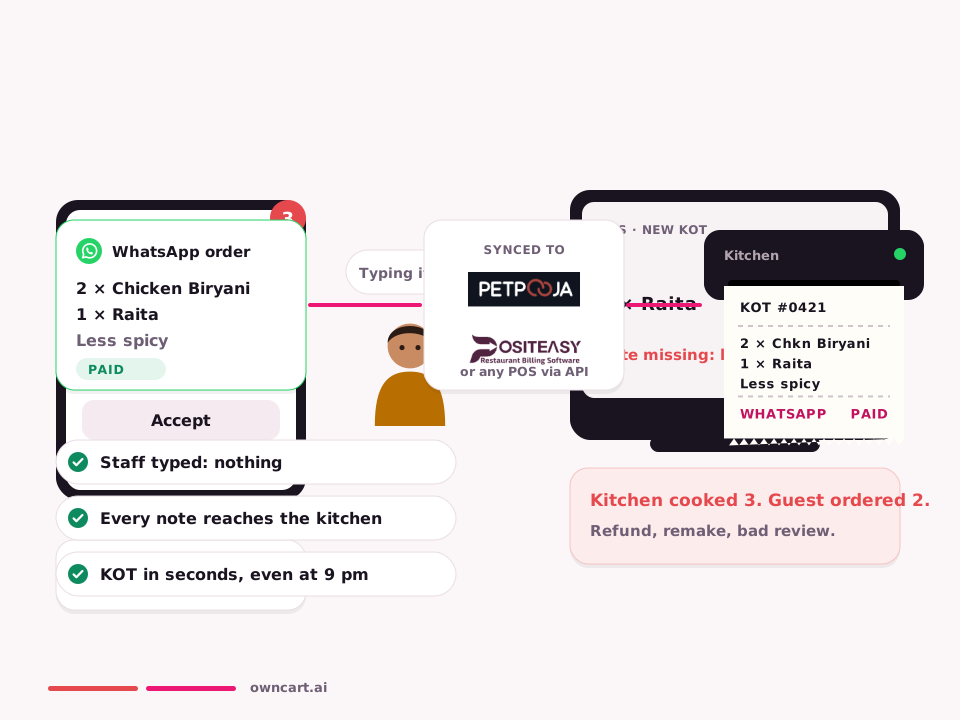
OwnCart has two-way sync with PetPooja. The menu syncs from PetPooja to OwnCart; website, WhatsApp and table QR orders are created in PetPooja automatically so the KOT prints; order status updates flow back to the guest on WhatsApp; and bills can be sent as green bills on WhatsApp. Sold-out dishes disappear online.
Watch OwnCart + PetPooja live
A real walkthrough: a WhatsApp order, payment, the KOT in PetPooja and status updates to the guest.
One order, four syncs, zero re-typing
Tap each step, or let it play.
Menu sync
Change a price or mark a dish sold out in PetPooja. Your website, WhatsApp menu and table QR update by themselves.
Order creation
A guest orders on WhatsApp. The order is created in PetPooja automatically and the KOT prints in the kitchen.
- 1 × Chicken Biryani (Full)
- 2 × Parotta
Status updates
Staff move the order in PetPooja. The guest sees every step on WhatsApp, without calling you.
Green bills
The bill from PetPooja goes to the guest's WhatsApp. No paper, and the guest joins your customer list.
What changes on day one with PetPooja
Without OwnCart
- Online orders typed into the POS by hand
- Prices updated twice: POS and online
- Guests call to ask “where is my order?”
- Paper bills, no customer numbers
- 25–30% commission on regulars' orders
With OwnCart × PetPooja
- Orders created in PetPooja automatically, KOT prints
- Menu synced from PetPooja to every channel
- Status updates reach the guest on WhatsApp
- Green bills on WhatsApp; every guest saved
- 0% commission on your own channel
Six reasons owners switch on direct ordering
No commission
Take orders on your website, WhatsApp and table QR and keep the full bill. Flat ₹10,000 per outlet per year.
True two-way sync
Menu from PetPooja, orders into PetPooja, status and bills back to the guest. One system of record.
Nothing to re-type
Every online order prints in the kitchen like a counter order, with the right items and add-ons.
WhatsApp ordering
Guests say Hi, order in a menu that opens inside WhatsApp, and pay by UPI or card.
Green bills that grow your list
Bills go to WhatsApp, and every guest becomes a contact you can bring back with offers.
Delivery without riders
Hire Adloggs riders on demand with a delivery quote before the order is placed.
What syncs, exactly
| Sync | Direction | What happens |
|---|---|---|
| Menu sync | PetPooja → OwnCart | Dishes, prices, categories and availability come from PetPooja. Change once in the POS; your website, WhatsApp menu and table QR update. |
| Order creation | OwnCart → PetPooja | Every website, WhatsApp and table QR order is created in PetPooja automatically, so the KOT prints like any counter order. No re-typing. |
| Order status updates | PetPooja → OwnCart → guest | When staff accept, prepare or complete the order in PetPooja, the status updates in OwnCart and the guest gets it on WhatsApp. |
| Green bills | PetPooja → guest's WhatsApp | The bill goes to the guest on WhatsApp instead of paper, and the guest's number joins your customer list for future offers. |
| Bill data for marketing | PetPooja → OwnCart → OwnChat | Segments on real spend and visits, e.g. guests who spent ₹5,000+ or haven't visited in 30 days. |
Go live in six steps
- Connect PetPoojaLink PetPooja to each outlet in OwnCart's POS settings.
- Sync the menuPull dishes and prices from PetPooja into OwnCart.
- Match every dishCheck that each OwnCart dish is matched to its POS item. An unmatched item means a wrong KOT, so do this before going live.
- Set order rulesAuto-accept paid online orders; keep cash on delivery manual if riders carry risk.
- Turn on green billsSend bills to guests on WhatsApp.
- Test every channelPlace a test order from the website, WhatsApp and a table QR, and check the KOT and status updates.
PetPooja specifics
- Sold-out (86) sync: dishes marked unavailable in PetPooja disappear from the online menu.
- POS-led status: when PetPooja owns the order status, some status changes are locked in OwnCart so the two never disagree.
- Pickup label: self-pickup orders show as “Pickup” in PetPooja.
Proof
Tositos in Chennai (Anna Nagar and Velachery) runs PetPooja and takes orders directly on WhatsApp. Co-founder Gayathri: “We've completely eliminated commission charges charged by Swiggy and Zomato.”
A Chennai restaurant on PetPooja
We take orders directly on WhatsApp. We've completely eliminated commission charges charged by Swiggy and Zomato.Gayathri, Co-Founder, Tositos · Chennai · runs PetPooja
Simple pricing for PetPooja restaurants
Restaurant + PetPooja sync
Two-way PetPooja sync, website, WhatsApp and table QR ordering, payments, Adloggs delivery. 0% commission. WhatsApp and gateway charges at cost.
Book a PetPooja demoCommon questions
What does the two-way POS sync include?
Menu sync, order creation in the POS (so the KOT prints), order status updates to the guest on WhatsApp, and green bills sent on WhatsApp. It works with both PetPooja and Positeasy.
Do I have to change how my kitchen works?
No. Online orders arrive in your POS and print as a KOT like any other order. Staff keep using the POS they know; OwnCart adds the online channels.
How long does it take to connect my POS?
Most restaurants can go live within days: connect the POS for each outlet, sync and match the menu, set payments and delivery, then place test orders. Our team does the setup with you.
What is a green bill?
A digital bill sent to the guest on WhatsApp instead of printed on paper. With OwnCart's POS sync, bills from PetPooja or Positeasy can be sent to the guest's WhatsApp, which also adds them to your customer list.
Does OwnCart take a commission on restaurant orders?
No. OwnCart charges 0% commission on orders. You pay a flat ₹10,000 per outlet per year for the Restaurant plan. Payment gateway fees (for example Razorpay) and Meta's WhatsApp message charges are billed separately.
Can I use OwnCart without a POS?
Yes. Restaurants without a POS can take orders on the OwnCart live order board, print or share GST invoices, and manage menu availability directly in OwnCart.
Related pages
Connect PetPooja and go live this week.
Book a 15-minute demo. We'll connect a test outlet to PetPooja and place a live order with you.
- 0% commission on every order
- Free digital menu to start
- Set up in Tamil or English