
How Owncart works: from a free menu to direct orders.
Start free on day one, switch on ordering in the first week, and let WhatsApp bring guests back every week after. Every channel runs from the same menu and lands on the same board.
- 0% commission on every order
- Free digital menu to start
- Petpooja & Positeasy sync
Last updated
How does Owncart work for a restaurant?
Restaurants start with a free digital menu and table QR codes on day 1. In week 1 they upgrade to the Restaurant plan, connect Razorpay, their WhatsApp number and Petpooja or Positeasy, and set delivery. After that, orders from the website, WhatsApp and table QR land on one live board that beeps, guests get WhatsApp updates at every step, and cart reminders and 30-day win-back run on WhatsApp through Ownchat.
- At a glance
- Day 1
- A free digital menu from a photo, a QR code for every table and a starter website
- Week 1
- Restaurant plan, Razorpay, your WhatsApp number, Petpooja or Positeasy, delivery, table QR and staff roles
- Every day
- Website, WhatsApp and table QR orders on one live order board; the KOT prints; guests get WhatsApp updates
- Every week
- Cart reminders, 30-day win-back, campaigns to a segment and the dashboard
- Channels
- WhatsApp, your ordering website, table QR and pickup QR, from one menu — all features
- Price
- Free ₹0 to start; ordering on the Restaurant plan, ₹10,000 per outlet per year, 0% commission
Day 1, week 1, every day, every week: how a restaurant goes live
- 1
Day 1: free digital menu
Upload a photo of your paper menu. AI drafts the dishes and prices, you check it, publish and print a QR code for every table. Guests see your menu tonight.
- 2
Week 1: switch on ordering
Upgrade to the Restaurant plan (₹10,000 per outlet per year). Connect Razorpay for payments and your WhatsApp number, connect Petpooja or Positeasy and match every dish, set delivery radius, fees and riders, turn on table QR ordering and add staff with the right roles.
- 3
Every day: run service
Orders from the website, WhatsApp and table QR land on one live board that beeps. Paid orders print as a KOT, riders or delivery partners are assigned from the board, and guests get WhatsApp updates at every step.
- 4
Every week: grow
Abandoned-cart reminders and 30-day win-back go out on WhatsApp through Ownchat. Send festival or new-dish campaigns to the right segment, and check the dashboard for direct orders, returning guests, bestsellers and coupon results.
Doing the menu first? Follow paper menu to digital menu. Switching on WhatsApp ordering? Use the setup checklist.
One order, from Hi to delivered
Every channel feeds the same board, so the kitchen runs one way whether the order came from WhatsApp, the website or table 6.
- 1
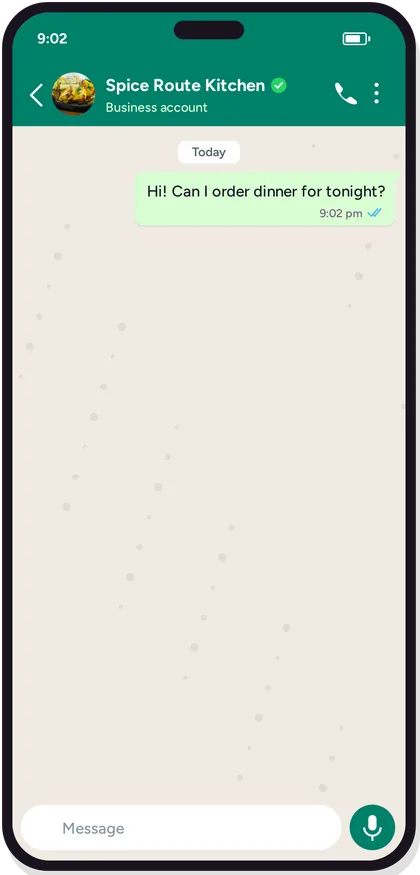
A guest says Hi on WhatsApp
Or opens your ordering website, scans the table QR or the pickup QR. The same menu opens on every channel and shows only what the kitchen can cook right now.
- 2
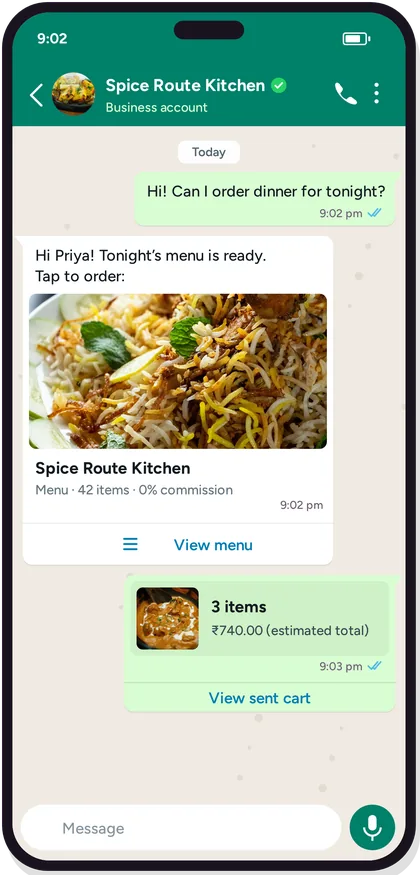
Picks dishes and pays by UPI
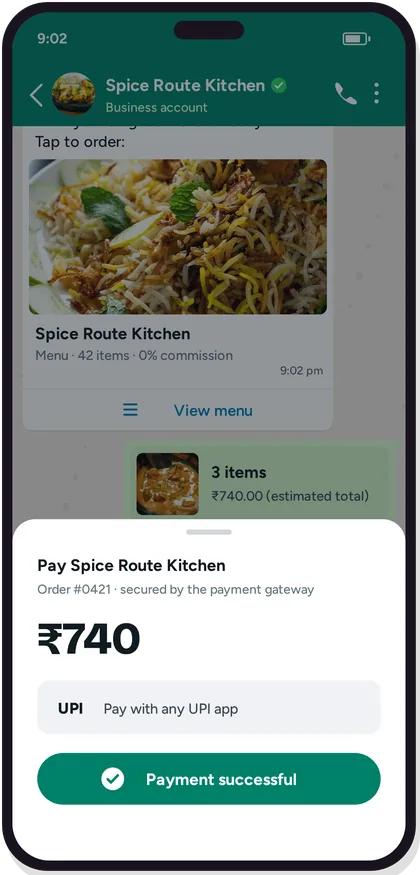
Portions and add-ons the way the kitchen plates. Razorpay UPI or card before you cook; cash on delivery only where you allow it, and unpaid payment links expire.
- 3
The board beeps, the KOT prints
The order lands on the live order board. Staff accept it, or online-paid orders auto-accept in the rush. With Petpooja or Positeasy connected, the KOT prints in the kitchen without retyping.
- 4
Ready, then out the door
Mark it ready. Dine-in tickets carry the table number, pickup guests get an OTP for the counter, and delivery orders go to your own rider or an Adloggs, Shadowfax or Porter task from the same ticket.
- 5
The guest is told at every step
Received, accepted, ready, out for delivery, delivered: each state becomes a WhatsApp update. Nobody types a status.
- 6
The guest stays on your list
Number, address and order history stay with you. After 30 quiet days a win-back with a Buy Again link can go out on WhatsApp through Ownchat.
Six things you switch on in the first week
Each one is a page of its own. Together they turn the free menu into a channel that takes paid orders.
Razorpay payments
UPI and cards on every channel, paid before you cook. 0% Owncart commission; payment gateway fees apply.
Your WhatsApp number
Guests say Hi, get a secure link, order and pay inside the chat. Your number, your guest list.
Petpooja or Positeasy
Connect the POS and match every dish. Online orders print as a KOT, and menu and stock follow the POS. Works without a POS too.
Delivery radius, fees and riders
Set where you deliver and what it costs. Your own riders run drops on the Owncart Rider app; Adloggs, Shadowfax or Porter for overflow.
Table QR ordering
Turn the free QR menu into ordering and payment at the table. The KOT carries the table number.
Staff with the right roles
Admin and Teammate logins. The floor runs the board and the KOT; only Admin refunds.
How Owncart works in 30 seconds
The four phases above, as one short film.
- Day 1: a photo of the paper menu becomes a digital menu with a QR for every table.
- Week 1: payments, WhatsApp, the POS and delivery switch on, and the first paid order lands on the board.
- Every week after: cart reminders, win-back and campaigns bring regulars back direct.
“We take orders directly on WhatsApp. We've completely eliminated commission charges charged by Swiggy and Zomato.”
Start free on day 1. Pay a flat fee in week 1, not a cut.
WhatsApp ordering, your ordering website, table QR and pickup QR, Razorpay payments, Petpooja or Positeasy sync, delivery and staff roles, for one outlet. 0% commission on every order.
Start free0% commission. GST extra. Payment gateway fees apply. WhatsApp charges are billed per delivered message, at the rates in our Message Price File, which we share separately. It's never a cut of your sale. Full pricing →
How long does it take to go live on Owncart?
Your digital menu and table QR codes can be live the same day you upload your menu. Online ordering goes live once you connect payments (Razorpay), WhatsApp and, if you use one, your POS.
What do I get on day 1 with the free plan?
Upload a photo or PDF of your menu and Owncart's AI builds your digital menu. You get a QR code for each table and a starter website, so guests can see your menu the same day. Upgrade to the Restaurant plan to take paid orders.
Do I need a POS before I switch on ordering?
No. Restaurants without a POS take orders on the live order board and print or share the GST invoice PDF. If you run Petpooja or Positeasy, connect it in week 1 and online orders print as a KOT. See POS and KOT sync.
Which ordering channels switch on in week 1?
WhatsApp ordering, your ordering website, table QR and pickup QR, all from the same menu on the Restaurant plan. Orders from every channel land on the same live order board, and guests get WhatsApp updates whichever channel they used.
What runs by itself every week, and what do I send?
Abandoned-cart reminders and 30-day win-back messages go out on WhatsApp through Ownchat, and the dashboard tracks direct orders, returning guests, bestsellers and coupon results. Festival or new-dish campaigns you send yourself, to the segment you choose. Ownchat comes with the Own Suite, ₹25,000 per outlet per year.
What does it cost once ordering is on?
The Restaurant plan is ₹10,000 per outlet per year with 0% commission; the free digital menu stays free. GST extra; payment gateway fees apply. WhatsApp charges are billed per delivered message, at the rates in our Message Price File, which we share separately. It's never a cut of your sale. See pricing.
Can I set Owncart up myself, or does someone help?
Both. Start free yourself at store.owncart.ai with a photo of your menu, or book a demo and we set it up with you in Tamil or English.
Put your menu online tonight.
Start free with a photo of your menu, or book a 15-minute demo and we'll set it up with you.
- 0% commission on every order
- Free digital menu to start
- Set up in Tamil or English