The cart that stopped at the delivery fee
A guest picked three dishes, reached the address step and put the phone down. Nobody knows it happened, so nobody follows up, and the biryani she wanted is cooked for someone else.
 ×

Owncart takes the order and saves the guest. Ownchat, our WhatsApp marketing engine, brings them back: a cart reminder with the pay link, a win-back after 30 quiet days, broadcasts to the right segment, and the revenue each message brought, on one screen.
Last updated
Owncart restaurants retarget guests on WhatsApp through Ownchat, on top of Owncart. An abandoned cart gets a reminder with the order summary and pay link, 4 hours later as standard. A guest with no order for 30 days gets a win-back offer with a Buy Again link. Segments use Petpooja bill data, such as ₹5,000+ spend. Click-to-WhatsApp ads, broadcasts, green bills and feedback requests are tracked to revenue.
A guest picked three dishes, reached the address step and put the phone down. Nobody knows it happened, so nobody follows up, and the biryani she wanted is cooked for someone else.
A Friday regular stops ordering. No list notices, no message goes out, and the next time you hear of her is never. The app she moved to knows exactly when she left.
A broadcast goes to everyone, an ad gets likes, a festival menu goes out as a PDF. At month end nobody can say which message brought which order, so the budget goes to whoever shouted last.
Keep aggregators for new guests. Bring regulars direct. Campaign ideas that bring regulars back →
Table and counter QR, Click-to-WhatsApp ads, Instagram automation and green bills capture the guest's number on every visit. Each one lands in a list you own, not an app's.
WhatsApp ordering, the AI chatbot and Petpooja KOT sync take the order. Abandoned-cart and win-back workflows follow up on their own, with the pay link or a Buy Again link.
OwnRewards gives them a reason to return, segments are built on POS bills, payments close the loop, and the ROI dashboard shows the revenue each message brought.
Owncart sends Ownchat the moments that matter: a cart left behind, an order paid, 30 days of silence. The follow-up carries the exact order, so the guest pays without re-entering anything. See the order side on WhatsApp ordering.
A guest stops at the address or delivery-fee step. Owncart records the cart and sends it to Ownchat. After a wait you choose (4 hours is the standard play) they get their exact order summary with a pay link or Check out button. The cart is synced, so nothing is re-entered.
Ownchat watches each guest's last order. At 30 days without one they move to the Inactive segment and get a personal message with their history, a worthwhile offer and a Buy Again link for their favourite dishes. The order goes to Petpooja as a KOT with no staff step.
Because Owncart connects your POS, segments use real bill data: total spend (a P1 high-value segment at ₹5,000 and above), last purchase date, order frequency and favourite dishes. Guests sort into New, Repeat and High-Value on their own.
Send festival menus, new dishes or weekend offers to the right segment instead of everyone, and schedule the follow-up messages as a journey.
Order confirmation, preparing, out for delivery, delivered and payment reminders go out on their own, so staff stop answering “where is my order?”.
Ask for feedback after delivery or dine-in, and catch an unhappy guest before they post a public review.
Ownchat is Ieyal Solutions' WhatsApp platform, from the same company as Owncart. It runs on your Owncart orders and guest list, so marketing starts from what actually sold.
Run Instagram and Facebook ads that open a chat with your menu. Every order is traced back to the ad, so you see real ROI instead of likes.
A keyword reply to the comment in under a second, then a DM with the menu and a payment button. Comment → DM → payment → confirmation, automated. Part of the multi-channel add-on.
Send the bill on WhatsApp instead of paper. The guest's number is captured at billing, and your list grows with every dine-in.
A guest who opens your menu while you are shut leaves their number. When you open, they get a “we're open” message with the menu.
One shared WhatsApp inbox for your staff, with AI summaries and suggested replies, and an AI chatbot that answers menu and timing questions in the guest's language.
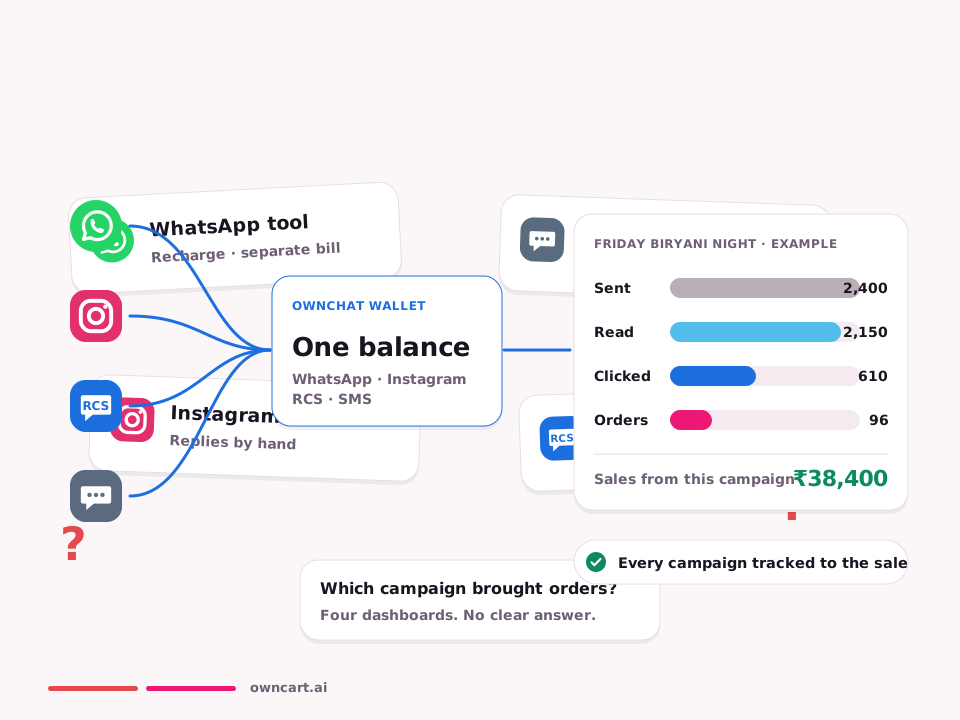
Revenue is attributed to the exact broadcast, workflow, ad or conversation that drove it, with first-touch and last-touch views and a Success Ratio of payment links paid against sent.
Three dishes in the cart at 1:10 pm, then silence at the address step. At 5:10 pm Ownchat sends the exact order with a pay link, in time for dinner. The guest pays without re-entering anything, and the ticket lands on the board.
Workflow · cart abandoned 13:10 · reminder 17:10 · paid ₹620
“Your order is waiting: 2 × Chicken Biryani, 1 × Raita · Pay ₹620”
Segments come from Petpooja bills, so guests with ₹5,000 or more of spend are tagged P1 on their own. The Diwali sweets menu goes to them a week early; everyone else gets it later.
Segment P1 · spend ≥ ₹5,000 · 48 guests · broadcast scheduled
“Priya, our Diwali sweets menu opens for you first. Pre-book your box.”
A guest comments “price?” on the reel. The keyword reply lands in under a second, the DM carries the menu and a payment button, and the confirmation follows the payment. Nobody on your team typed a word.
Instagram · comment “price?” → DM → paid ₹340 · attributed to the reel
Gets the menu in a DM, pays, and sees the confirmation in the same thread
| Stage | What runs | Result for the restaurant |
|---|---|---|
| Connect | Table and counter QR, Click-to-WhatsApp ads, Instagram automation, green bills | Every guest becomes a contact you own |
| Automate | WhatsApp ordering, AI chatbot, Petpooja KOT sync, abandoned-cart and win-back workflows | More orders with no extra staff |
| Succeed | OwnRewards, segments on POS bills, ROI dashboard, payments | Regulars order more often, and you can prove what works |
| Trigger | Wait / condition | Action on WhatsApp |
|---|---|---|
| Cart abandoned | 4 hours, no order placed | Order summary + pay link |
| No order for 30 days | Guest moves to Inactive | Personal offer + Buy Again link |
| Total spend ≥ ₹5,000 | Guest tagged P1 | VIP offers and early festival menus |
| Order delivered | Shortly after delivery | Feedback request |
| Visitor while closed | Next opening time | “We're open” message with the menu |
Example. The abandoned-cart wait is yours to choose; 4 hours is the standard play.
Twenty-three seconds on the win-back and OwnRewards: the two things that turn a first order into a habit.
“We take orders directly on WhatsApp. We've completely eliminated commission charges charged by Swiggy and Zomato.”
Tositos runs two Chennai outlets on Petpooja and takes orders directly on WhatsApp with Ownchat and Owncart.
Flat fees per outlet per year, 0% commission on your orders. GST extra; payment gateway fees apply. WhatsApp charges are billed per delivered message, at the rates in our Message Price File, which we share separately. It's never a cut of your sale. Full pricing →
A digital menu from a photo, a QR for every table and a starter website. Upgrade when you take orders.
Ordering on WhatsApp, website, table QR and pickup QR, your guest list and order status updates on WhatsApp. Per outlet per year, 0% commission.
Owncart ₹10,000 + Ownchat WhatsApp ₹5,000 + OwnRewards Standard ₹10,000: campaigns, workflows and loyalty on one bill. Per outlet per year.
The Ownchat multi-channel add-on, including Instagram comment-to-DM with your menu. Per outlet per year, on top of the Own Suite.
It runs on Ownchat, Ieyal Solutions' WhatsApp platform from the same company as Owncart, connected to your Owncart orders and guest list. It is included in the Own Suite at ₹25,000 per outlet per year; ask us for Ownchat plan pricing on its own.
Yes. When a cart is abandoned at the address or delivery-fee step, Owncart sends the event to Ownchat, which sends a WhatsApp reminder with the order summary and a payment link after a wait you choose, 4 hours as standard. Because the cart is synced, the guest pays without re-entering anything.
Ownchat watches each guest's last order. At 30 days without one, the guest moves to the Inactive segment and gets a personal message that mentions their history, a worthwhile offer and a Buy Again link for their favourite dishes. The order goes to Petpooja as a KOT with no staff step.
WhatsApp charges are billed per delivered message, at the rates in our Message Price File, which we share separately. It's never a cut of your sale. Because the menu opens as a page inside WhatsApp, an order needs only a few messages instead of a long chatbot conversation.
You do. Every order saves the guest's phone number, addresses and order history in your Owncart account. You can segment it, message it on WhatsApp through Ownchat and export it as CSV.
Yes. You keep your WhatsApp Business number and app, and add Ownchat automation and campaigns on top.
Win-back messages and segments run on Ownchat. OwnRewards adds points earned on orders and applied at Owncart checkout, a reason to order direct between messages. Standard is included in the Own Suite; on its own it is Starter ₹1,499, Growth ₹2,499 or Pro ₹6,999 a month billed yearly, GST extra. See OwnRewards loyalty.
Book a 15-minute demo of abandoned-cart recovery and the 30-day win-back on your own menu, or start free with a photo of your menu.