
Everything between “Hi” and “Delivered”
Fifteen feature areas, built around a restaurant's day: from the first WhatsApp message to the KOT, the rider and the next repeat order.
Last updated
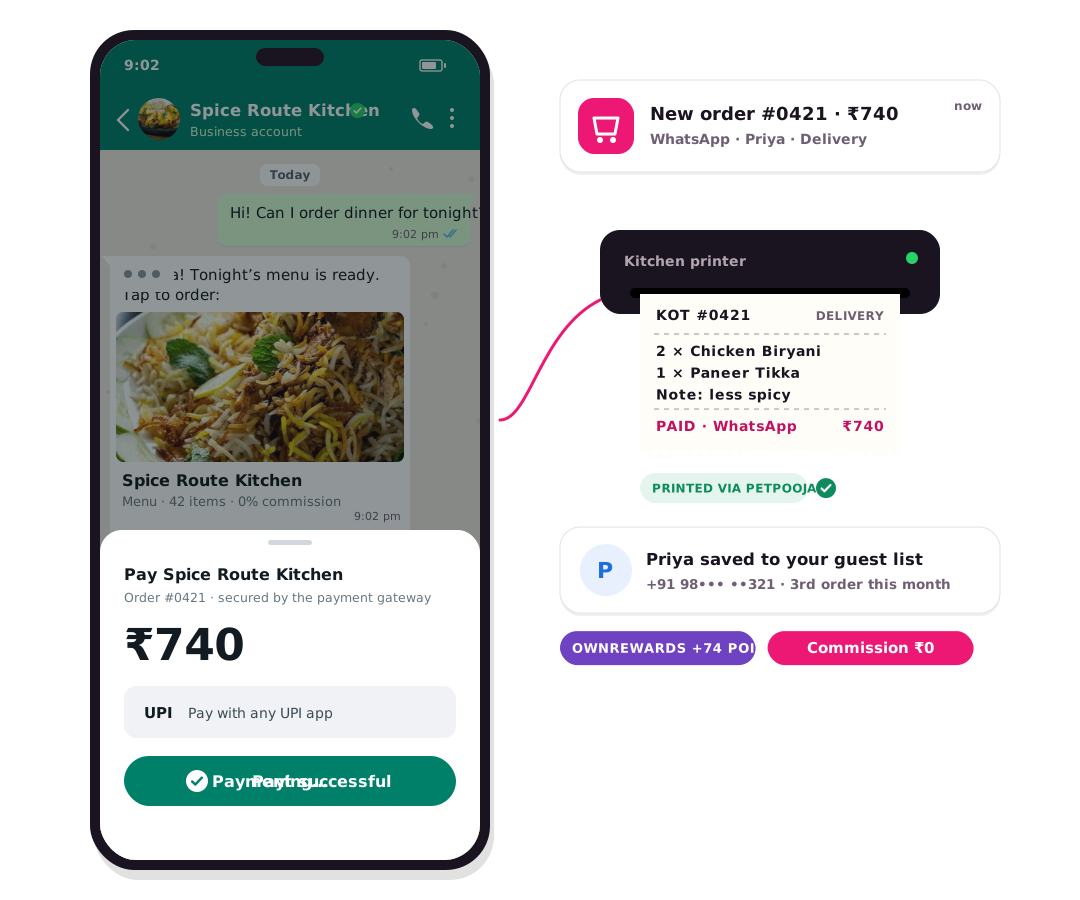
OwnCart for businesses includes a live order board, PetPooja and Positeasy sync, an AI-built menu, a branded ordering website, WhatsApp ordering and marketing, table QR ordering, delivery with own riders or partners, payments with 0% commission, pre-booking, discounts and loyalty, customer segments, reports, multi-outlet management and cancellation rules.
Live order board
Every order from every channel lands on one screen that beeps for new tickets.
- Order flow: Received → Accepted → Ready → Dispatched → Delivered, plus cancel and return
- Filters by status, payment, order type, pre-booking and date
- Staff can create orders for phone guests and attach a table for dine-in
- “Needs attention” flags stuck orders and payment errors
- GST invoice PDF from every order
POS and KOT sync
OwnCart works with the POS your kitchen already runs.
- Two-way sync with PetPooja and Positeasy
- Menu sync: dishes, prices and availability from your POS
- Order creation: online orders created in the POS, KOT printed
- Order status updates from the POS to the guest on WhatsApp
- Green bills: POS bills sent to the guest on WhatsApp
- Auto-accept online-paid orders in the rush; works without a POS too
Branded ordering website
Your business, your domain, your customers.
- Restaurant template and header, edited in Website Studio
- Draft, preview, publish and restore earlier versions
- Custom domain, policy pages and per-dish SEO
- Installs on the guest's phone as an app (PWA)
- Text and voice search, guest browsing before login
- Meta Pixel and Google Tag Manager for ad tracking
WhatsApp ordering
Turn “Hi” into a paid order.
- Secure OwnCart link opens inside WhatsApp
- Customers recognised by their WhatsApp number
- Pay by UPI or card in the chat; unpaid links expire
- Order confirmation and status updates on WhatsApp
- Fewer messages per order than a chatbot, so lower Meta charges
WhatsApp marketing and retargeting
Powered by OwnChat, connected to your OwnCart orders.
- Abandoned cart reminders with order summary and pay link
- 30-day win-back with a Buy Again link
- Segments from POS bills: spend, last visit, frequency
- Broadcasts and drip campaigns
- Click-to-WhatsApp ads and Instagram comment-to-DM automation
- Green bills, feedback requests and revenue per campaign
Table QR ordering
Service without waiting for a waiter.
- One QR per table, downloaded as a print-ready PDF
- Ask for party size, or use the table's seating capacity
- Orders reach the KOT with the table number
- Online payment at the table; guests can move tables
Delivery and pickup
Your riders first, partners for overflow.
- Own riders, or hire riders on demand through Adloggs
- Adloggs delivery quote fetched before the order is placed
- Delivery charge paid by the restaurant or added to the guest's bill
- Shadowfax and Porter for overflow
- Local delivery radius (minimum 5 km) or standard delivery
- Fees: flat, per km, by order value or mixed
- Address at checkout with map pin or form
- OTP for pickup and delivery, auto-close pickup orders
- Delivery points for IT-park lobbies
Payments
Paid before you cook.
- Razorpay UPI and cards on the website, WhatsApp pay in chat
- Online and COD switched on per outlet; COD minimum order
- Tax-inclusive menu prices
- Automatic refund when a guest cancels before cooking
- Daily ledger: COD cash vs online
- 0% OwnCart commission
Pre-booking and advance orders
Plan the rush instead of reacting to it.
- Switch on for weekends and festivals only
- Delivery, pickup and dine-in pre-booking
- Slots with a maximum number of orders each
- Only selected dishes, with minimum notice
- Campaign cards on your website and slot fill stats
Discounts, loyalty and content
Your own promotions instead of paying for aggregator ones.
- Percentage, fixed, buy-one-get-one, tiered, bundle and free delivery
- Common codes and unique influencer codes
- Offers only for chosen segments or dishes, in time windows
- Free delivery hidden from pickup orders
- OwnRewards points at checkout
- Banners, blog and testimonials on your site
Customers and segments
Know your regulars by name.
- Phone OTP login at add-to-cart or checkout
- Customer stages: new, recurring, loyal
- Saved addresses for one-tap repeat orders
- Custom fields such as spice level
- Captures visitors while you are closed for a next-day message
- CSV export of any segment
Dashboard and reports
What came direct, and from whom.
- Orders, revenue and average bill
- New vs returning customers
- Bestsellers and revenue by category
- Discount, return and cancellation reports
- Pre-booking fill
Multi-outlet and staff
Run every branch from one login.
- Per-outlet hours with force open/close
- Per-outlet POS, payments and delivery
- Order ID prefixes like CHN- and TRY-
- Roles: Admin and Teammate; refunds for managers only
- API keys and webhooks for your other systems
Cancellations and returns
Fair to guests, safe for the kitchen.
- Guests request cancellation in the app; auto-approved before you accept
- Cancel refused once cooking starts
- Food marked non-returnable; wrong-item claims with photo proof
- Abandoned cart list and export
Common questions
Does OwnCart support multiple outlets?
Yes. Each outlet has its own hours, menu availability, POS connection, payments, delivery settings and order ID prefix, all managed from one admin with staff roles.
Can I use OwnCart without a POS?
Yes. Restaurants without a POS can take orders on the OwnCart live order board, print or share GST invoices, and manage menu availability directly in OwnCart.
Can I use my own domain?
Yes. The Restaurant plan includes a custom domain for your ordering website, for example order.yourrestaurant.com. You can start on a free OwnCart address.
Related pages
Put your menu online tonight.
Start free with a photo of your menu, or book a 15-minute demo and we'll set it up with you.
- 0% commission on every order
- Free digital menu to start
- Set up in Tamil or English