“Half or full?” A call for every biryani
The order says Chicken Biryani and nothing else. The counter calls the guest back, the guest doesn't pick up, and the kitchen waits with the rice.

Give each dish its portions, each with its own price and stock, and add-on groups with limits the guest can't push past. A thali says choose 2 sides and means it. The guest picks the plate on their phone, sees the right price before paying, and nobody calls to explain.
Last updated
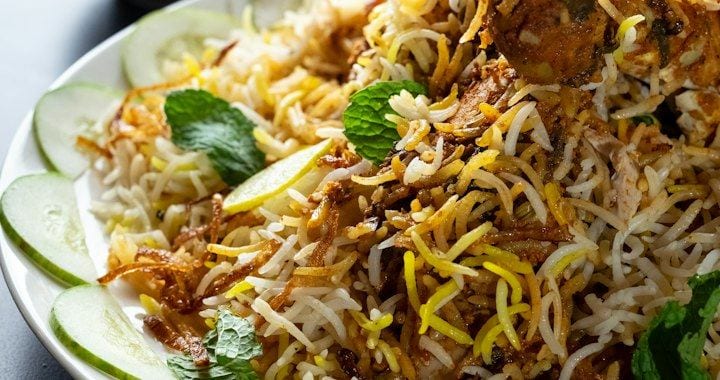
Variations are the versions of one dish: Half and Full, sizes, Mild or Hot, each with its own price and stock. Add-ons are extras grouped with limits, like extra cheese 0–2 or a thali's choose 2 sides. Guests pick them on every channel, see the right price before paying, and the KOT prints the portion and add-ons.
The order says Chicken Biryani and nothing else. The counter calls the guest back, the guest doesn't pick up, and the kitchen waits with the rice.
Choose 2 sides becomes four in the notes box. Staff argue about it at the counter while the ticket cools and the next guest waits.
Biryani (Half) and Biryani (Full) typed as separate dishes, each with its own photo and stock. Mark one sold out and the other still sells; change a price and you change it twice.
One dish, its portions and its add-ons, priced the way the kitchen plates. See the menu it lives in →
Chicken Biryani, with its photo and its veg or non-veg label. Draft it from a photo of your paper menu or sync it from Petpooja or Positeasy.
Half and Full, each with its own price and its own stock. Sizes and spice levels like Mild or Hot work the same way, on the same dish.
Extra cheese 0–2. Thali: choose 2 sides. The guest can't go past the limit, so the plate the kitchen receives is a plate it can make.
On the website, WhatsApp, table QR or pickup QR, the guest picks the portion and extras and sees the right price before UPI or card.
The portion and every add-on print on the KOT in Petpooja or Positeasy. Change a price or mark Half sold out from your phone; every channel follows.
With Positeasy, variations and add-ons are priced correctly on the online order and coupons still apply. See Owncart × Positeasy.
Half and Full on one dish, not two. Each portion carries its own price, so the bill is right before the guest pays and a price change happens once.
Each portion has its own stock, so Half can run out while Full stays on sale, on every channel at once.
Extra cheese 0–2. Choose 2 sides on a thali. Set the limit once; the guest can't push past it, and nobody argues at the counter.
Mild or Hot, Regular or Large, set as options on the dish, so the kitchen reads one line on the ticket instead of a note.
The portion and every add-on print on the KOT in Petpooja or Positeasy, with the table number for dine-in.
Upload a photo or PDF and the AI drafts dishes and prices. Check Half / Full prices and combo items first; they are the easiest to misread.
Options are not a setup task. They move with the kitchen during service.
The guest picks Full and adds raita inside WhatsApp. The price is right before UPI, and the KOT prints Full + extra raita. Nobody calls to ask which portion.
Half/Full options and “choose 2 sides” limits match how the kitchen plates
Guest picks Full biryani + extra raitha without a phone call
The limit sits on the add-on group, not in a notes box. A guest at table 4 picks two sides and stops, so the counter stops arguing and the ticket reaches the kitchen the way it is plated.
Table 4 · Veg Thali · sides: Poriyal, Kootu (2 of 2) · KOT printed
Choose 2 sides · 2 of 2 selected · ₹180 before pay
Size as an option, extra shot as an add-on with a limit. The guest orders from the pickup QR, the paid order auto-accepts, and the barista reads one line on the ticket.
Pickup QR · Cappuccino (Large) + Extra shot × 1 · auto-accepted
Large · Extra shot 1 of 2 · Pay by UPI

Dishes, prices and availability sync from the POS; the online order prints as a KOT, portion included.

Variations and add-ons are priced correctly on the order, and coupons still apply.
Guests pick portions and add-ons in the menu that opens inside the chat.

The portion and add-on price is on the bill before UPI or card.
No. They are part of the Owncart menu, on the same plan as WhatsApp ordering and the live order board. Start free with a digital menu; ordering runs on the Restaurant plan, ₹10,000 per outlet per year with 0% commission.
A variation is a version of the dish, Half or Full, Mild or Hot, and the guest picks one. An add-on is an extra on top, like extra cheese, grouped with a limit such as 0–2.
Yes. Each portion carries its own price and its own stock on one dish, so Half can run out while Full stays on sale, and you never maintain two copies of the same biryani.
Yes. Every add-on group has a limit: extra cheese 0–2, or a thali's choose 2 sides. The guest can't go past it, so the kitchen only ever receives a plate it can make.
Yes. Website, WhatsApp, table QR and pickup QR all open the same menu, so the portions, spice levels and add-ons are identical everywhere, and a change made once shows on every channel. See WhatsApp ordering for the full Hi → pay → KOT flow.
Yes. The portion and each add-on print on the KOT in Petpooja or Positeasy, with the table number for dine-in orders. Without a POS, the same detail is on the live order board and the GST invoice PDF. See POS and KOT sync.
It drafts them, and you check. Half / Full prices and combo items are the easiest to misread, so review those first in the menu editor before you publish.
Start free with a photo of your menu, or book a 15-minute demo and we'll set up your options with you.